
Google Preferred Sources gives readers a way to tell Google which websites they trust and want to see more frequently.
When someone selects your website as a preferred source, Google may highlight your articles with a “Preferred” badge in Top Stories, AI Overviews and AI Mode. This can help publishers, bloggers and subject-matter experts build a more direct relationship with their regular readers.
However, Preferred Sources is not a replacement for SEO, and it does not guarantee rankings or AI citations. It is an audience preference signal that works alongside Google’s normal search and quality systems.
This guide explains who can use Google Preferred Sources, how to add the official button to WordPress and how to measure whether it improves your visibility.
What Is Google Preferred Sources?
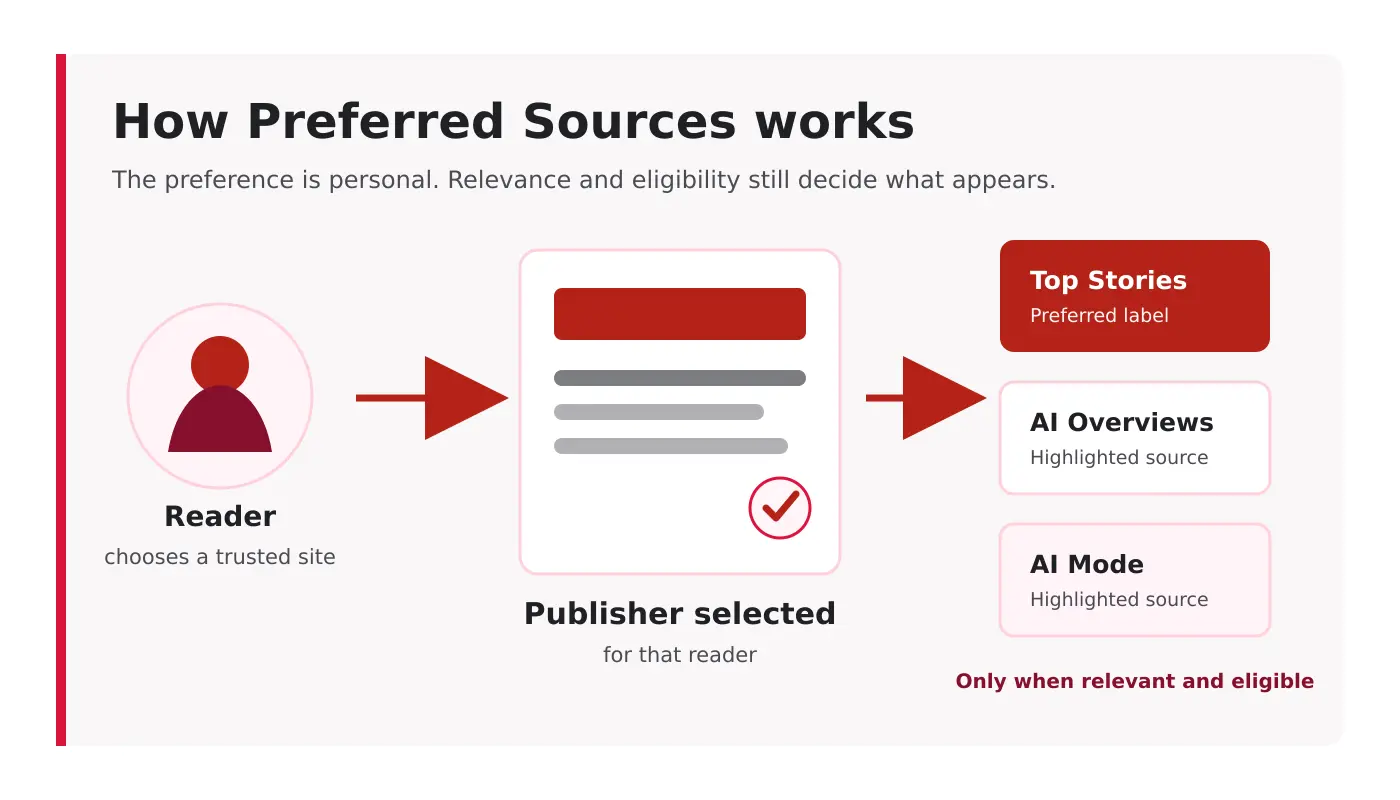
Google Preferred Sources is a search-personalization feature that allows users to choose websites they want Google to prioritize within certain search experiences.
After a user selects a website, content from that domain can:
- Appear more prominently in Top Stories
- Receive a “Preferred” label
- Stand out within AI Overviews
- Be highlighted within Google AI Mode
- Appear in relevant article and perspective carousels
The preference applies to the individual user. It does not automatically increase the website’s rankings for everyone.
According to Google’s announcement, people are twice as likely to click a result after marking its website as a preferred source.
That makes the feature particularly valuable for publishers and experts with an existing audience on social media, email, YouTube or professional communities.
The Important Distinction: Preference Is Not Ranking
It is important to describe this feature accurately.
Adding a Preferred Sources button does not:
- Guarantee higher organic rankings
- Make every article appear in AI Overviews
- Force Google to cite the website
- Replace backlinks, technical SEO or content quality
- Allow a publisher to select itself on behalf of visitors
- Create sitewide authority immediately
The feature only helps a user select the publication as one of their preferred sources.
Google still needs to crawl, index and understand the website. The content must continue to satisfy Google’s search policies and quality systems.
Preferred Sources should therefore be treated as an audience-retention feature, not a ranking hack.
Where Can Preferred Sources Appear?
A selected source can receive additional visibility in three important Google surfaces.
Top Stories
When a user searches for a timely subject, articles from their preferred publications may appear more prominently in the Top Stories section.
This makes the feature useful for websites that regularly publish fresh industry news, analysis, updates or expert commentary.
AI Overviews
Content from a selected website may be highlighted with a Preferred badge when it is included among the supporting links shown in an AI Overview.
The preference does not guarantee inclusion. The page still needs to be relevant, indexed and eligible to appear in Google Search.
Google AI Mode
Preferred websites can also be highlighted among the sources presented inside Google AI Mode.
This creates an opportunity for specialist publishers to remain visible as users move from short keyword searches toward longer, conversational questions.
Is Your Website Eligible?
Before adding the button, check whether your website appears in Google’s source preferences tool.
The key eligibility requirements are:
- The source must be a domain or subdomain
- Individual subdirectories are not eligible as separate sources
- The website should publish fresh content
- The website must be discoverable in Google Search
- For AI Mode and AI Overviews, the site must be included in Search generative AI features in Search Console
- Pages must remain indexable and eligible to appear with search snippets
For example:
https://example.com/ can be eligible.
https://news.example.com/ can be eligible as a subdomain.
https://example.com/blog/ cannot be registered separately from its main domain.
You can check a website through Google’s source preferences tool.
If the domain does not appear, adding the button alone will not make the implementation work. Resolve any indexing, eligibility or publication-identity issues first.
Can Pakistani Publishers Use Google Preferred Sources?
Yes. Google’s official Preferred Sources documentation says the feature is available globally for Top Stories in all languages. Visibility in AI Mode and AI Overviews depends on whether those search experiences are available to the user and whether the publisher’s content is eligible and relevant.
For Pakistani publishers, the practical first step is the same as it is elsewhere: search for the domain in Google’s source preferences tool before promoting the button. If the site appears, readers can select it regardless of where the publisher is based.
How to Add the Google Preferred Sources Button
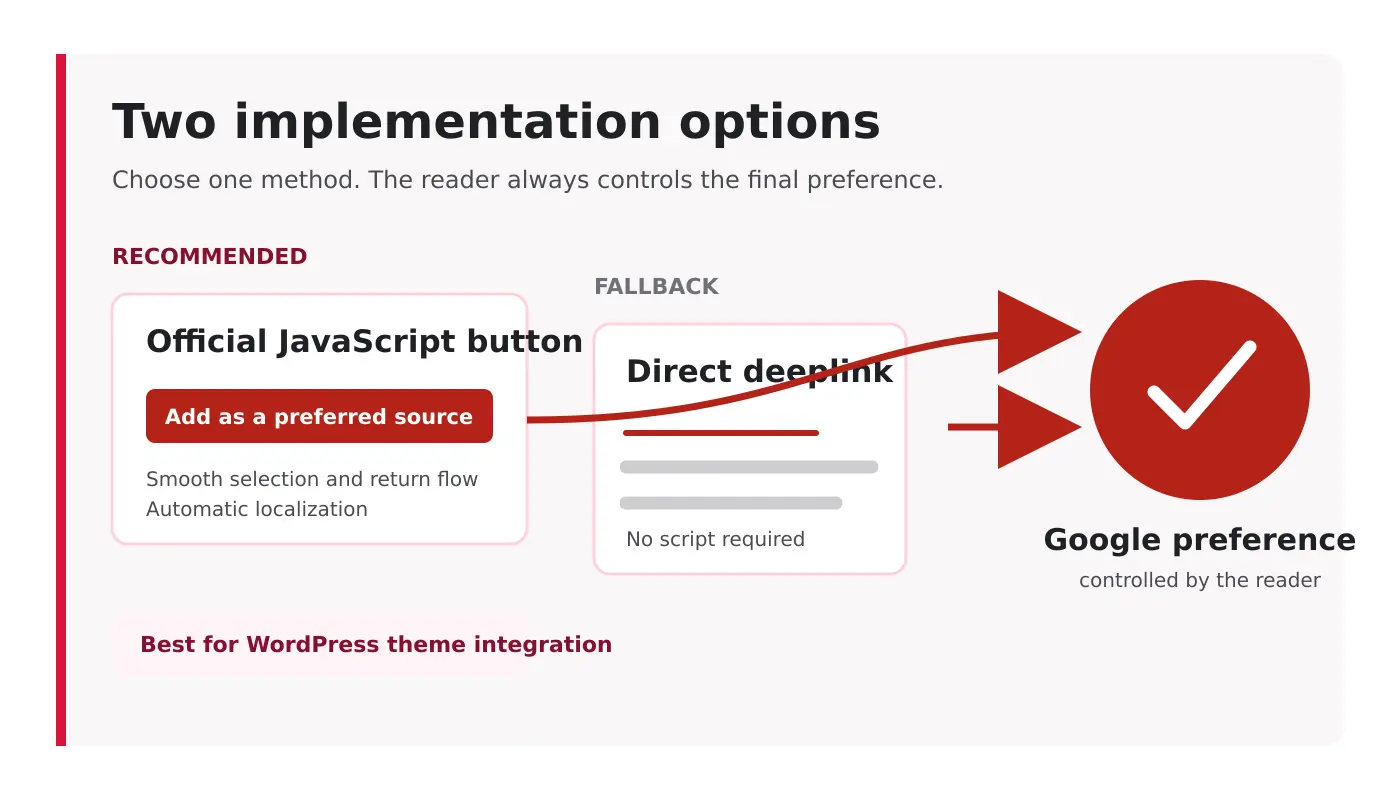
Google provides a standard JavaScript implementation that requires only two pieces of code.
Step 1: Load Google’s Preferred Sources Library
Add the following script inside the <head> section of the website:
<script async src="https://news.google.com/swg/js/v1/publisher.js"></script>The async attribute allows the library to load without blocking the rest of the page.
Do not add the script repeatedly on every template component. It should normally be loaded once through the theme, child theme or a properly configured header-injection method.
Step 2: Add the Button
Place the following element wherever you want the button to appear:
<div google-add-preferred-source-btn></div>Google will convert this element into its official, automatically localized Preferred Sources button.
When a reader selects it, Google opens the preference flow and returns the visitor to the page afterward.
Light and Dark Button Options
The standard button uses a light theme by default.
For a dark website section, use:
<div google-add-preferred-source-btn data-theme="dark"></div>For a light section, use:
<div google-add-preferred-source-btn data-theme="light"></div>The button should have adequate space around it and remain clearly visible. Avoid placing it inside an overcrowded sidebar or between unrelated advertisements.
Setting the Button Language
Google normally chooses the button language according to the visitor’s browser settings.
You can override this behavior:
<div google-add-preferred-source-btn data-lang="en"></div>For most multilingual websites, allowing Google to select the language automatically will provide the better user experience.
Adding Preferred Sources to WordPress
WordPress website owners have several implementation choices.
Child-theme implementation
Developers can enqueue the Google script through the active child theme and place the button inside the relevant template.
This is usually the cleanest approach when the website already uses a custom child theme.
The script can be loaded using wp_enqueue_script():
function site_preferred_sources_script() {
    wp_enqueue_script(
        'google-preferred-sources',
        'https://news.google.com/swg/js/v1/publisher.js',
        array(),
        null,
        false
    );
}
add_action( 'wp_enqueue_scripts', 'site_preferred_sources_script' );
The button can then be added to an author section, article template or dedicated subscription block:
<div google-add-preferred-source-btn></div>Header-injection plugin
A header-injection plugin can load the script without editing the theme.
This is easier for nontechnical users, but the script should still be added only once. Check the rendered HTML afterward to ensure that another plugin or theme component has not duplicated it.
Custom HTML block
The button element can be placed inside a WordPress Custom HTML block.
The external script must still be loaded separately in the site header.
Deeplink Alternative Without JavaScript
Websites that cannot use the JavaScript library can link directly to Google’s source preferences tool.
The format is:
https://www.google.com/preferences/source?q=example.com
For ShazzSEO, the link format would be:
https://www.google.com/preferences/source?q=shazzseo.com
A simple link could look like this:
<a href="https://www.google.com/preferences/source?q=shazzseo.com">
    Add ShazzSEO as a Preferred Source
</a>
Always verify that the domain appears in the source preferences tool before promoting the link.
The JavaScript implementation provides a smoother experience because the visitor can complete the selection and return to the original page.
Where Should the Button Be Placed?
Button placement should match the moment when the reader has enough confidence to select the website.
Good locations include:
- Below an expert author biography
- Near the end of a detailed article
- Beside an email-subscription option
- On an About or editorial-standards page
- Inside a returning-reader callout
- In a lightweight section above the footer
Avoid making the button the first thing a new visitor sees. Asking for preference before providing value may feel premature.
For an expert-led website such as ShazzSEO, the strongest position would be directly below the author biography or near the end of evidence-led SEO articles.
A suitable callout could say:
Found this analysis useful? Add ShazzSEO as a Preferred Source to find more of my SEO, GEO and automation research in Google Search and AI experiences.
How to Convince Readers to Select Your Website
The technical button is the easy part. Giving readers a reason to use it is more important.
Publish recognizable expertise
Readers are more likely to select a source when they know what it consistently covers.
A website publishing unrelated articles about SEO, universities, medical careers, gadgets and general news will have a weaker identity than a specialist publication with clearly defined editorial hubs.
Add firsthand evidence
Google’s current guidance emphasizes useful, non-commodity content with experience and a unique point of view.
Strong evidence can include:
- Original screenshots
- Search Console data
- Controlled SEO tests
- Before-and-after comparisons
- Failed experiments
- Client case studies with permission
- Expert observations
- Original workflows and templates
An article that merely summarizes other articles gives readers little reason to select the publisher as a trusted source. A deliberate information-gain approach helps turn familiar coverage into something readers can only get from your publication.
Maintain a consistent publishing focus
Preferred Sources works best when users understand what they will receive from the publication.
For ShazzSEO, the clearest areas are:
- Technical and semantic SEO
- AI search visibility
- GEO and AEO analysis
- WordPress SEO
- SEO automation
- Pakistan freelancing and digital business
These subjects should remain organized into clear editorial hubs.
Every important article should display:
- The author’s full name
- Relevant professional experience
- A link to the author page
- A visible update date
- Sources for factual claims
- An editorial or review policy where appropriate
This does not guarantee rankings, but it helps readers evaluate whether the source deserves their continued attention.
Preferred Sources and AI Search Optimization
Preferred Sources should not be confused with a special method for manipulating AI systems.
Google states that AI Overviews and AI Mode continue to depend on its core search ranking and quality systems.
The practical requirements remain familiar:
- Publish genuinely useful content
- Make pages crawlable and indexable
- Use clear headings and page structure
- Maintain accurate titles and descriptions
- Provide original experience and evidence
- Support important claims with reliable sources
- Keep information updated
- Use structured data where it accurately describes the page
Google does not require special AI schema, artificial content chunking or an llms.txt file for visibility in its generative search features.
Preferred Sources adds an audience-preference layer. It does not bypass the underlying search systems.
How to Measure the Results
Google Search Console now includes dedicated generative-AI performance reporting for AI Overviews, AI Mode and generative features in Discover.
The report can show:
- AI-feature impressions
- Pages appearing in generative results
- Countries
- Devices
- Visibility by date
- Hourly, daily, weekly or monthly trends
Use these reports to establish a baseline before promoting the Preferred Sources button.
Recommended measurement plan
Before implementation
Record the previous 28 days of:
- Generative-AI impressions
- Pages appearing in AI features
- Branded searches
- Returning visitors
- Email subscribers
- Organic conversions
After implementation
Monitor the same metrics for at least another 28 days.
Also track:
- Clicks on your Preferred Sources callout or deeplink
- Pages where the button receives the most engagement
- Changes in returning organic visitors
- Changes in branded query impressions
- Changes in generative-AI visibility
Do not attribute every improvement to the button. Rankings, publishing activity, algorithm updates, seasonality and external mentions can all affect performance.
The purpose of the comparison is to identify useful patterns, not manufacture a success claim.
Common Preferred Sources Mistakes
Treating it as a guaranteed ranking factor
Google has not described Preferred Sources as a universal ranking boost. Its effect is tied to the preferences of individual users.
The website should appear in the source preferences tool before the feature is promoted.
Expecting a subdirectory to qualify separately
Google supports domains and subdomains, not individual folders such as /blog/.
Publishing generic content to support the feature
A preference button cannot compensate for repetitive or low-information articles.
Do not tell readers that selecting the site will automatically improve its rankings. Explain that it helps Google highlight the website for that user.
Loading the script multiple times
Duplicate scripts create unnecessary requests and can cause implementation problems.
Ignoring performance
The official script is asynchronous, but the implementation should still be checked in PageSpeed Insights and browser developer tools.
Is Google Preferred Sources Worth Implementing?
It is worth implementing when a website:
- Publishes content consistently
- Has returning readers
- Covers recognizable specialist topics
- Has an email or social-media audience
- Produces original analysis
- Wants stronger visibility across Google’s AI experiences
It will have limited value for a thin affiliate website, an inactive blog or a site without a clear editorial identity.
For expert publishers, the feature represents something valuable: a way for readers to express trust directly inside Google Search.
Frequently Asked Questions
Does Google Preferred Sources improve rankings?
It does not provide a guaranteed sitewide ranking increase. It can make content from a selected website more prominent for users who have chosen that source.
Does Preferred Sources help with AI Overviews?
Preferred websites can be highlighted inside AI Overviews when their content is relevant and included among the supporting sources.
A WordPress website can add the code, but the domain should first appear in Google’s source preferences tool and meet the relevant eligibility requirements.
Can I select my website for every visitor?
No. The user controls their own source preferences. A website can only invite readers to select it.
Does Preferred Sources replace SEO?
No. Pages still need to be crawlable, indexable, relevant and helpful. Google’s normal ranking and quality systems continue to determine eligibility and visibility.
Do I need special schema for Google Preferred Sources?
Google does not require special structured data for the feature. Use standard structured data only when it accurately represents the page and its content.
It can be added sitewide, but contextual placement is better than repetition. Place it where visitors have already received value, such as below the author biography or near the end of an article.
Final Thoughts
Google Preferred Sources gives publishers an opportunity to convert occasional search visitors into recognized readers.
The implementation itself is simple. The official version requires one asynchronous script and one button element.
The difficult part is earning the selection.
Readers will only choose a website when its content is original, trustworthy, useful and consistently focused. That makes Preferred Sources less of an SEO trick and more of an editorial challenge.
Build a publication people remember, give them a clear reason to return, and then make it easy for them to select your website as a source they trust.