
Nowadays site making is a trending thing and everyone is curious to know about the best way to create a site. People frequently ask about the use of www or non-www in the URLs of sites. A lot of people confused about the URL structure of the website. In this article, I will help you to know the best way to your URLs and WordPress SEO.

The distinction between WWW Vs NON-WWW:-
When you use www with your URL or write it before the address of your site it attracts the users and gives you the attribute of a hostname and in this way, many of the cookies and other things are restricted easily.It looks like a professional DNS and gives your site more flexibility and you can use multiple subdomains.
But when you do no use www your domain is attributed as the naked and have to face many restrictions and cannot enjoy any technical benefit.
WWW vs NON-WWW Gains:-
In fact, there are no gains in choosing either method. Both give the same benefits and aids. Even Google has told us that it depends on you that what you choose and how you do this.
In the simple word do not change your URL and accept it the way it is.You will surprise to know that Google like to know about your decision and respect your decision and do not cause any hindrance to it.
How to Set Preferred URL in Google WebMaster tools
All you should do is to visit your Google Webmaster Tools of your account and click to open your Site. If your site does not have Google Webmaster Tools then please follow the following steps:-
- All you need to do is to click the Gear symbol and click the option Sit settings.

- When you click it you have to choose your desired domain.
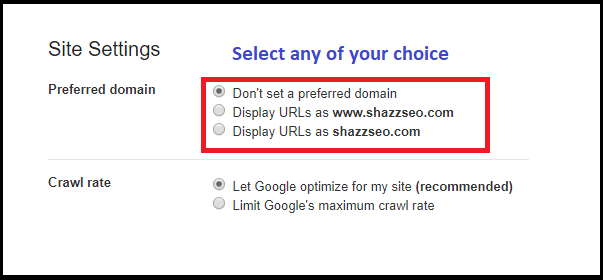
You can select to display as www or without www.
How to Set Website URL Structure on WordPress
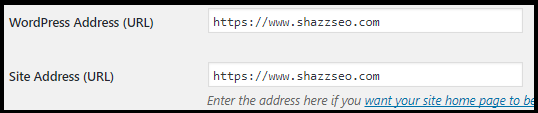
- You can also set this on your Website WordPress settings.
- Go to WordPress Dashboard>> Setting>> Click on General.
- Now you can Select the preferred Domain which you want to choose.
Conclusion:-
It is not a big game to add WWW or NON-WWW it is all your wish that what you want to do.You just have to think about your choice. As there is no big difference between the two.
Read: How to Add index website on Google?
A migration checklist that prevents duplicate versions
Google has no general ranking preference for www or non-www. The SEO risk comes from allowing both hosts to resolve as separate indexable URLs. Pick one version, redirect every request on the other host with a server-side 301, and make the canonical tag, XML sitemap, internal links and Search Console property consistent.
- Record the current indexed hostname and backlink destination before changing anything.
- Configure the preferred hostname at DNS/server level and in WordPress Address and Site Address.
- Test HTTP, HTTPS, www and non-www variants. Each alternative should reach the preferred URL in a single hop.
- Update hard-coded internal links and canonical tags rather than relying indefinitely on redirects.
- Resubmit the sitemap and monitor indexing, crawl errors and host-level traffic.
Do not change hostname merely because one version “looks more professional.” Migrate only when consistency or infrastructure requires it. Google’s canonicalization documentation explains the signals used to consolidate duplicate URLs.
When www can be operationally useful
A www host can make cookie scope and DNS/CDN configuration easier for complex organisations using many subdomains. A non-www hostname is shorter and works well for most small sites. These are infrastructure considerations, not ranking advantages.
Can you switch later?
Yes, but treat it as a site migration. Keep the same path after the hostname change, avoid redirect chains, update analytics and advertising destinations, and retain redirects long enough for users and search engines to adopt the new host.
How do you verify the change?
Test representative URLs with an HTTP header checker and inspect the rendered canonical. Do not rely only on what appears in the browser address bar.
Bottom line: choose the hostname that suits the infrastructure, then enforce it consistently everywhere.