I have seen a lot of newbie asking this question that How to turn off Pingbacks and trackbacks in WordPress easily.
Before Going further into the detail First, we need to know what is A pingback?
“It is a type of comment that’s created when you link to another blog post where pingbacks are enabled. The best way to think about pingbacks is as remote comments: Person A posts something on his blog. Person B posts on her own blog, linking to Person A’s post.”

The Question is Why we should Disable Pingbacks?
In early days of blogging the pingback and trackback was introduced to notify blogs about each other links.
Example :
Suppose you write a Post and link your friend website on your post, so your blog will automatically send a ping to your Friend blog.
So this will come up with comment approval of your friend’s blog.
Which is very annoying for anyone nowadays.
People nowadays use this trick to get Lot of backlinks as you can see sometime Spammy comments always awaits approval which doesn’t relate to your articles.
So That’s why you need to disable these Pingbacks to keep yourself away from this problem.
I Hope you have no clear idea about pingbacks, So
How to get rid of PingBacks?
If you want to get rid of Pingbacks you don’t need to worry about it because it’s easy.
Well, its easy way to disable Pingbacks you don’t need any expertise to do that just follow my steps.
WordPress allows you to turn off this option So it is easy to turn it off from WordPress.
Follow These Steps
- Login to Dashboard of WordPress.
- Click on Setting >> Discussion.
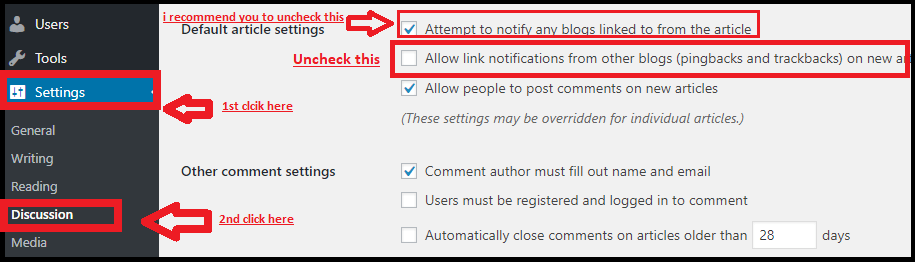
- Actually, as you can read here it will turn them off only on new articles only.
- But you need to turn it off also on existing posts too.
How to Disable Pingbacks on Existing Posts?
- First of click on Post>>> All Post.

- Now Select all Post on your blog because you need to Disable ping from all of your posts.
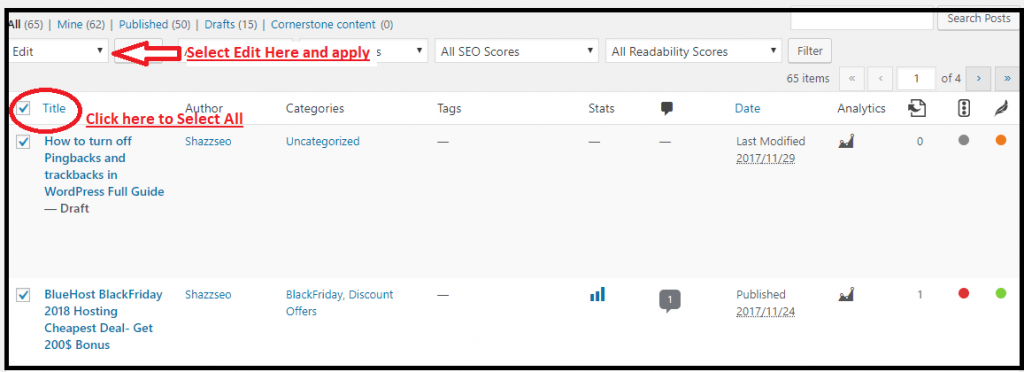
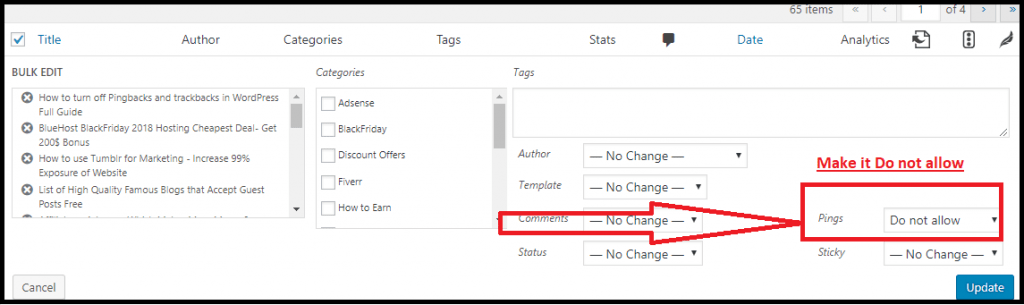
- Now After selecting all post Click on Edit and apply. You will see a Box as shown below, you just need to turn the Ping off.
That’s it.
Now you are Safe from this issue. I hope it will be easy for you but still if you have any problem let me know. in the comment box.
Spam does not only arrive through pingbacks. If your inbox is the problem rather than your comments, a temporary email service keeps your real address out of every signup form you fill in.
What disabling pingbacks changes—and what it does not
Turning off “Allow link notifications from other blogs” prevents new posts from accepting pingbacks and trackbacks. It does not remove existing records, disable normal comments or stop your site from linking to other websites. Existing posts may retain their original discussion setting, so use the Posts bulk editor for older content and test on a staging copy before updating a large archive.
For most business sites, the practical benefit is a cleaner moderation queue and less automated comment noise. It is not a meaningful speed optimization by itself. If XML-RPC is disabled for security reasons, confirm that remote publishing, mobile apps or integrations do not depend on it.
Reference: WordPress Discussion Settings documentation.
Why pingbacks may still appear after disabling them
An old post can retain its individual discussion setting, a queued notification may already exist, or a plugin can generate comment-like records. Open the affected post, check Discussion settings and inspect the comment type before assuming the global option failed.
Should normal comments also be disabled?
Not necessarily. Pingbacks are automated link notifications; ordinary comments are reader submissions. You can disable one and keep the other with moderation and anti-spam controls.
Will disabling pingbacks hurt SEO?
No direct ranking benefit depends on accepting pingbacks. Genuine editorial backlinks still work because they are links on another website, not records in your comment database.
Can you disable pingbacks for one post only?
Yes. Open that post’s Discussion panel and change its individual setting; the global option controls the default for new content.