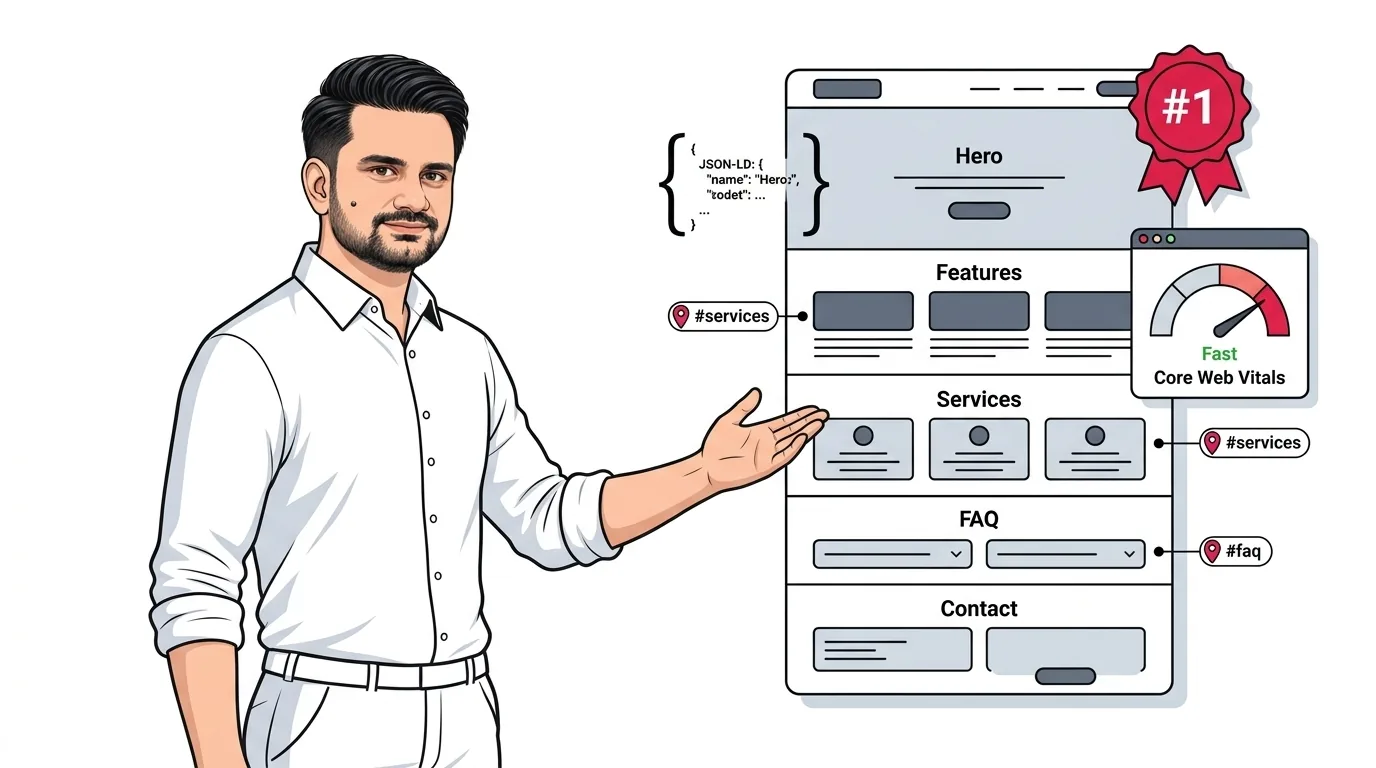
Mastering seo for one page website layouts is one of the most misunderstood challenges in modern search. While traditional multi-page sites spread keyword intent across dozens of distinct URLs, executing seo for single page website designs requires ruthless keyword prioritization, flawless HTML heading hierarchies, section fragment anchor tags, and concentrated domain authority.
Single-page websites (often built on Webflow, Framer, WordPress, or custom React landing pages) offer undeniable conversion benefits: frictionless scrolling, immersive storytelling, and zero click friction for mobile visitors. However, when it comes to search engine optimization, single-page sites face inherent technical constraints: you have only one title tag, one meta description, one H1 heading, and one canonical URL to communicate your entire business to Google.
In this architectural guide, we explain how Google’s crawlers process single-page websites, provide a step-by-step framework to rank for target keywords, and reveal advanced schema markup and sectioning tricks that turn a one-page layout into an organic customer generation engine.
What Makes SEO for One Page Websites Different?
To succeed with seo for one page website projects, you must first understand how Google evaluates web documents. On a standard multi-page website, Google assigns each URL a specific topic: /services/web-design/ ranks for web design, while /services/seo/ ranks for search optimization.
On a single-page website, all information—your company overview, service features, pricing tiers, client testimonials, and contact form—lives on a single root URL (e.g., https://yourbrand.com/). This structure introduces distinct advantages and structural limitations:
| Architectural Dimension | Single-Page Website (One-Page) | Multi-Page Website |
|---|---|---|
| Keyword Scope | 1 Core Pillar Topic + 3–5 closely related semantic entities | Hundreds of disparate keyword themes across dedicated URLs |
| Backlink Equity | 100% Concentrated: Every external backlink boosts the root page | Diluted across blog posts, sub-pages, and utility archives |
| Conversion Rate (CRO) | High: Singular focus, linear story, clear call to action | Moderate: Multiple distractions and exit pathways |
| Total Organic Reach Ceiling | Limited: Cannot rank for broad topical clusters or long-tail guides | Virtually unlimited expansion through programmatic or blog silos |
The Core Dilemma: Keyword Dilution vs. Focused Intent
The number one mistake creators make when optimizing a single-page site is attempting to rank for five completely different services. For instance, a boutique agency trying to rank a single page for "Logo Design", "PPC Management", "Custom Webflow Development", and "SEO Auditing" will fail across all four.
Why? Because Google evaluates the primary topical entity of the document. If your page title and text jump erratically between unrelated disciplines, Google's semantic algorithms (such as RankBrain and Hummingbird) cannot determine the primary search intent. The page suffers from topical dilution.
To win on a one-page site, apply the One Primary Pillar + Semantic Spokes framework:
- The Core Pillar (80% Weight): The single overarching discipline your business owns (e.g., "B2B SaaS Onboarding Consultant" or "Emergency Plumber in Scottsdale"). This keyword dominates your
<title>tag and single<h1>. - The Semantic Sub-Entities (20% Weight): Distinct sub-features that naturally support the core pillar (e.g., "User Activation Audits", "Product-Led Growth Architecture", "Retention Analytics"). These become dedicated
<h2>section headings.
If you need to rank for dozens of niche sub-topics, review our strategy on long-tail keyword strategy for niche websites to understand when dedicated cluster pages become necessary.
On-Page Architecture: Fragment Identifiers & Anchor Links
In standard web navigation, clicking a menu link loads a new HTML document. On a single-page website, menu links utilize fragment identifiers (hash anchors) to smoothly scroll the user to specific content sections.
Search engines fully recognize fragment identifiers. When properly structured, Google often features individual anchor sections as jump-to sitelinks directly inside organic search results snippets.
Semantic HTML5 Sectioning Blueprint
Structure your single-page layout using modern HTML5 semantic elements (<section>, <nav>, <header>, <footer>) with clean, keyword-relevant id attributes:
<!-- Navigation with Anchor Links -->
<nav role="navigation">
  <a href="#about">About</a>
  <a href="#services">Services</a>
  <a href="#case-studies">Case Studies</a>
  <a href="#faq">FAQ</a>
  <a href="#contact">Contact</a>
</nav>

<!-- Content Sections with Matching Fragment IDs -->
<main>
  <section id="hero">
    <h1>Primary Keyword & Value Proposition</h1>
  </section>

  <section id="services">
    <h2>Specialized Service Breakdown</h2>
  </section>

  <section id="faq">
    <h2>Frequently Asked Questions</h2>
  </section>
</main>
Ensure that your anchor names are clean, lowercase, and hyphenated (e.g., id="technical-seo-audit" rather than id="sec_3_fix"). Descriptive IDs help Google’s crawler map the topical hierarchy of each viewport block.
Strict HTML Heading Hierarchy (H1, H2 & H3 Structuring)
Because you do not have multiple pages to guide the crawler, your document heading hierarchy must be flawless. Google uses heading tags as an outline to understand document topics.
Follow these four strict heading rules for single-page SEO:
- Exactly ONE
<h1>Tag: Your<h1>must appear in the hero section above the fold and include your exact primary keyword. Never use multiple<h1>tags on a single-page website. - Use
<h2>Tags for Major Sections: Every distinct visual section (Services, Methodology, Results, Testimonials, FAQ) must lead with an<h2>that contains semantic keywords. - Use
<h3>Tags for Individual Features or FAQ Items: Sub-cards inside a service grid or individual questions in your FAQ accordion should use<h3>tags. - Never Skip Heading Levels: Do not jump from an
<h1>directly to an<h4>merely for visual font sizing. Control visual sizing with CSS classes, keeping semantic HTML hierarchy intact.
Structured Data (Schema Markup): The Superpower for Single Pages
Structured JSON-LD schema markup is the most powerful tool for single-page websites in 2026. Because you lack multiple URLs to define your business entities, you can nest multiple schema types into a single cohesive Entity Graph on your homepage.
A well-architected single-page schema file should connect:
WebSite&WebPage: Defines the canonical URL, title, and descriptive metadata.OrganizationorLocalBusiness: Establishes your company name, founder, official social profiles (sameAs), logo, and address.Service(Array): Defines the individual commercial services detailed in your#servicessection.FAQPage: Marks up all questions and answers in your#faqsection, making your page eligible for rich results and AI search engine extraction.
Entity Disambiguation via JSON-LD
Nesting your services and FAQ items inside a single structured schema graph allows Google's Knowledge Graph to understand your business offerings with the same clarity as a 50-page enterprise website.
Core Web Vitals & Performance Engineering for Single-Page Sites
The biggest technical trap of single-page sites is performance bloat. On a multi-page site, images and code are split across pages. On a one-page site, every video background, client logo, portfolio screenshot, and review script loads in a single HTTP session.
To pass Google’s Core Web Vitals (LCP under 2.5s, CLS under 0.1, INP under 200ms), execute these engineering optimizations:
- Modern WebP / AVIF Formats: Convert all portfolio and featured imagery to next-gen WebP or AVIF formats. Keep total initial page weight under 1.5 MB.
- Explicit Dimensions to Eliminate Layout Shift (CLS): Always declare explicit
widthandheightattributes on every<img>element to prevent Cumulative Layout Shift as assets load. - Native Lazy Loading for Below-the-Fold Sections: Add
loading="lazy"anddecoding="async"to all images in the portfolio, testimonial, and footer sections. Only the hero image should load eagerly withfetchpriority="high". - Self-Host Fonts: Avoid loading 4 different weights of Google Fonts through external render-blocking stylesheets. Self-host WOFF2 font files locally with
font-display: swap;.
Explore our specialized technical SEO services to audit and resolve Core Web Vitals bottlenecks on your web applications.
Off-Page SEO: The 100% Consolidated Backlink Advantage
While single-page websites have content limits, they possess an extraordinary off-page advantage: zero backlink equity dilution.
On an enterprise site with 500 pages, backlinks are scattered across old blog posts, author archives, and product pages. On a single-page site, every press feature, podcast interview link, guest post mention, and directory citation points directly to https://yourdomain.com/.
This concentrates 100% of your Domain Rating (DR) and Page Authority into the single page that is ranking. For localized or niche markets with moderate competition, a single-page site with 20 high-quality referring domains will often outrank massive competitor sites whose link equity is diluted across thousands of sub-URLs.
When to Stay One Page vs. When to Migrate to Multi-Page
Single-page SEO is ideal for specific business models, but it is not a permanent solution for every company. Use this operational framework to determine whether your site should remain single-page or expand:
| Scenario | Recommended Architecture | Strategic Reason |
|---|---|---|
| Early-Stage SaaS / Mobile App | One Page Website | Maximizes user conversion rate and concentrates early startup authority. |
| Solo Consultant / Executive Portfolio | One Page Website | Personal brand searches resolve to a single polished showcase. |
| Multi-Service B2B Agency | Multi-Page Architecture | Each distinct service requires dedicated keyword intent targeting. |
| E-Commerce Store | Multi-Page Architecture | Product categories and individual SKUs must be indexed individually. |
| National Content / Publisher | Multi-Page Architecture | Requires ongoing topical clusters and informational guides to scale reach. |
When you are ready to expand from a landing page into a full topical cluster architecture, learn the expected timeline in our breakdown of how long SEO takes to show results, and prepare the critical questions to ask when hiring an SEO company.
Frequently Asked Questions (FAQ)
Can a one-page website rank #1 on Google?
Yes. A single-page website can easily rank #1 for branded terms, local service queries (e.g., "wedding photographer in Aspen"), and specialized niche B2B phrases where competitors have modest domain authority. However, it cannot rank for broad, multi-intent keywords that require deep topic clusters.
How do I track conversions on a single-page site in Google Analytics 4?
In GA4, enable Enhanced Measurement to automatically track scroll depth (90% scroll). For section interactions, configure custom event triggers in Google Tag Manager (GTM) that fire whenever users click fragment anchor links (e.g., clicks on #contact or #pricing).
Which website builder is best for one-page SEO?
Webflow and clean custom HTML/Next.js frameworks offer the cleanest semantic code output and deepest control over heading hierarchy, custom schema, and sub-second asset delivery. WordPress with lightweight themes (like GeneratePress) also performs exceptionally well.
Conclusion & Actionable Single-Page SEO Checklist
Executing seo for single page website designs requires discipline. By picking a singular primary keyword pillar, structuring semantic HTML sections with clean fragment identifiers, nesting rich JSON-LD schema, and optimizing Core Web Vitals, you can build an authoritative, high-ranking digital footprint on a single URL.
Here is your 6-step single-page SEO launch checklist:
- Select 1 primary pillar keyword and feature it in your
<title>, meta description, and lone<h1>. - Divide content into semantic
<section>blocks with descriptive anchor IDs (e.g.,id="services"). - Lead every visual section with a keyword-optimized
<h2>heading. - Deploy nested JSON-LD schema combining
Organization,Service, andFAQPagetypes. - Convert all assets to WebP and lazy-load below-the-fold media to pass Core Web Vitals.
- Direct 100% of your digital PR and external backlink building to your root homepage URL.
Need custom architecture or high-performance development for your web application? Discover our custom website development and comprehensive SEO consulting services.
Need to Optimize Your Single-Page Site or Plan a Migration?
Whether you are scaling a single-page SaaS landing page or planning a clean architectural migration to a multi-page cluster, ShazzSEO provides precision engineering to protect your search rankings.